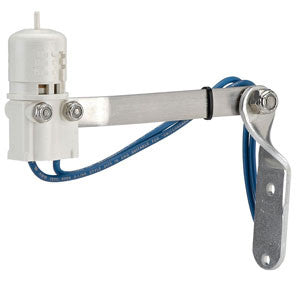
Brand: Hunter Industries SKU: MINICLIK
Product Overview
The Hunter MINICLIK Mini-Clik is a wired rain sensor designed to interrupt scheduled irrigation after an adjustable amount of rainfall. Installed outdoors in an unobstructed location, the sensor absorbs rain through its moisture-responsive discs and opens the compatible controller sensor circuit when the selected rainfall threshold is reached. As the discs dry after the storm, the sensor automatically restores normal controller operation.
The shutoff setting can be adjusted from approximately 1/8 inch to 1 inch of accumulated rain, allowing the installer to match the response to local climate, soil, plant material, and irrigation-management preferences. Adjustable vent rings change how quickly the sensor dries and therefore influence how soon automatic irrigation resumes after rainfall. The mechanical sensing design does not require a separate battery.
The standard Mini-Clik includes approximately 25 feet of 20 AWG, two-conductor sheathed wire for connection to a compatible low-voltage irrigation controller sensor input or approved sensor circuit. It should be mounted where it receives natural rainfall but is not affected by sprinkler spray, roof runoff, or sheltered overhangs. Controller compatibility and wiring method must be verified before installation, especially on systems that require a different sensor type or switching arrangement.
Key Features
- Adjustable rain shutoff from approximately 1/8 inch to 1 inch
- Automatically restores irrigation after the sensor dries
- Adjustable drying-rate vent ring
- Mechanical sensing design with no separate battery
- Includes approximately 25 feet of 20 AWG two-conductor wire
- Debris-tolerant sensor mechanism
- Optional SGM metal gutter mount available separately
Common Uses
- Preventing automatic irrigation during and after rainfall
- Residential and commercial sprinkler systems
- Retrofitting a compatible controller with a wired rain sensor
- Replacing a failed standard Mini-Clik sensor
Compatibility and Installation Notes
- Use with a compatible low-voltage irrigation controller or approved sensor circuit.
- Confirm the controller’s sensor-input wiring and normally closed switching requirements.
- Mount where the sensor receives natural rainfall and is not reached by irrigation spray.
- Avoid locations under roof overhangs, trees, or areas receiving concentrated gutter runoff.
- Route and protect the sensor wire according to Hunter and local wiring requirements.
- The high-voltage Mini-Clik configuration is a separate model and should not be substituted without confirming the electrical application.
Frequently Asked Questions
Does the Mini-Clik turn the irrigation controller off permanently?
No. It interrupts automatic irrigation while the sensor is wet and restores the sensor circuit after the discs dry.
Can the rainfall threshold be adjusted?
Yes. The shutoff threshold can be set from approximately 1/8 inch to 1 inch of rain.
Does the sensor require a battery?
No. The standard Mini-Clik uses a mechanical moisture-responsive sensing mechanism and a wired controller connection.
Why Buy from Big Frog Supply?
Big Frog Supply carries Hunter rain sensors, controller accessories, mounting hardware, wiring components, and irrigation repair parts.
Product Type Wired irrigation rain sensor
Manufacturer Part Number MINICLIK
Rainfall Shutoff Adjustment 1/8"–1"
Reset Automatic as moisture-responsive discs dry
Drying Rate Adjustable vent ring
Included Wire Approx. 25 ft; 20 AWG; two conductor
Power Source No separate battery
Controller Connection Compatible low-voltage sensor input or approved sensor circuit
Optional Mount SGM metal gutter mount sold separately