

Low Voltage Landscape Lighting Setup for Beginners
Transform your yard with our easy DIY guide. Learn how to plan, install, and enjoy low voltage landscape lighting without the cost of a professional.

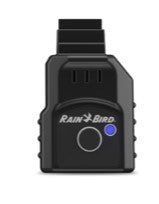
Rainbird proudly showcases the revolutionary, improved, upgraded direct replacement of its LNK WiFi Module - the Rainbird LNK2WIFI Module! Both the first generation (Grey) LNKWiFi and the 2nd Generation (Black) LNK2WIFI work with ESP-ME3, the ESP-TM2, and the ESP-ME Controllers manufactured after Nov 2016.
The innovative 2nd Generation LNK2WIFI module boasts additional capacities for future updates so that additional feature sets can be easily introduced. At no additional cost, features are enhanced so remote access to your residential and light commercial sprinkler systems is easy, convenient, and worry-free.
Materials Needed:
Rain Bird LNK2WIFI
Internet-connected device (smartphone, tablet, or computer)
2.4 Ghz WiFi network with a stable internet connection (not compatible with 5G)
Step 1: Preparation
Before starting the installation process, make sure you have all the necessary materials ready. Ensure that your existing Rain Bird ESP-Me irrigation controller is compatible with the LNK2WIFI Upgrade. Your Controller must be manufactured after Nov 2016 and have the Wifi Symbol on the front panel. Refer to the Rain Bird documentation or consult their customer support if you are unsure about compatibility.
Step 2: Power Off and Disconnect
To ensure your safety and prevent any electrical mishaps, turn off the power supply to your irrigation controller. Locate the circuit breaker that controls the controller and switch it off.
Step 3: Open the Controller Cabinet
Open the cabinet cover of the ESP-Me irrigation controller. Inside, you will find the existing controller unit.
Step 4: Locate the Remote Accessory Port
Locate the module slot on the back of the controller's front panel.
Step 5: Install the LNK2WIFI Module
Take the LNK2WiFI module and align it with the vacant slot on the controller's panel. Ensure that the pins on the module are correctly aligned with the socket in the slot. Gently push the module into the slot until it is firmly in place.
Using your smartphone, tablet, or computer, download the Rain Bird App and follow the easy step by step set up.
Congratulations! You have successfully installed the Rain Bird LNK2WIFI and configured it to connect to your WiFi network. Now you can conveniently control your irrigation system from your smartphone or tablet, allowing for more efficient and hassle-free irrigation management. Enjoy the benefits of remote control and monitoring, and optimize your watering schedule with ease.
Rain Bird Controllers For Residential Spaces
How to setup the Rain Bird LNK WiFi Module and the mobile app
Transform your yard with our easy DIY guide. Learn how to plan, install, and enjoy low voltage landscape lighting without the cost of a professional.

Print this quick checklist to start your sprinkler system safely, test each zone, catch leaks, and set a smart spring schedule in under an hour.

Run each zone for a few minutes, write down what you see, and you’ll know exactly what to fix (and what parts to buy). Download our printable Zone Log and make your spring sprinkler start-up faster and more efficient.
{"one"=>"Select 2 or 3 items to compare", "other"=>"{{ count }} of 3 items selected"}
Leave a comment