

Low Voltage Landscape Lighting Setup for Beginners
Transform your yard with our easy DIY guide. Learn how to plan, install, and enjoy low voltage landscape lighting without the cost of a professional.

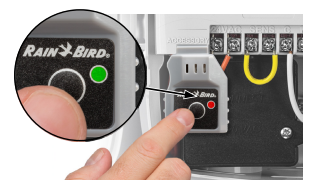

Connected to Controller

Sequence: Solid Red followed by three rapid Green flashes
Meaning: WiFi Module is booting up and has successfully connected with the Rain Bird controller connected with the Rain Bird controller
WiFi Hotspot

Sequence: Alternating Green and Red flashing
Meaning: Module is powered ON and broadcasting as WiFi Access Point (Hotspot – Rain Bird WiFi network only, no internet access)
No WiFi

Sequence: Red flashing with 2 seconds between
Meaning: Module is powered ON but is not connected to a WiFi network and not broadcasting a WiFi Access Point – this happens when a WiFi module is plugged in but not connected to a WiFi network within 20 minutes, or when it has lost a WiFi connection
Just Connected
Sequence: One Red flash followed by 5 rapid Green flashes
Meaning: Module has just connected to a local WiFi network
WiFi Connected with Internet Access

Sequence: Green flashing with 2 seconds between
Meaning: Module is powered on and is connected to a local WiFi network with internet, which is talking to the Rain Bird server
LAN Connected – no Internet

Sequence: Two rapid Green flashes separated by 2 seconds
Meaning: Module is connected to a local WiFi network but it does not have internet access and is not connected to the Rain Bird Server. There is no connection to the controller when the mobile device is not in the range of the wireless network.
Factory Reset

Sequence: Two Amber flashes followed by the “Connected to Controller” sequence (solid red followed by 3 rapid Green flashes) and then the “WiFi Hotspot” sequence (alternating Green and Red flashes)
Meaning: When the WiFi module button is held down for 5 seconds the WiFi module completes a factory reset where all WiFi network information is erased and it has to be connected again
WiFi Module Communication Error with the Controller

Sequence: Solid Red
Meaning: The WiFi module is not communicating with the controller. It is best to take the following actions to try to resolve this issue. If the first does not resolve the issue please continue trying the following steps.
System Reset

Sequence: One Amber flash without button push
Meaning: The WiFi module has detected an error and is completing a self-reboot to resolve the error
Rainbird proudly showcases the revolutionary , improved, upgraded direct replacement of its F55000 LNK WiFi Module - the Rainbird F55005 LNK2WIFI WiFi Module! Both the old and the updated Versions still only work with Controllers manufactured AFTER Nov 2017 with the wifi symbol on the front operating on 2.4 Ghz
This innovative 2nd Generation LNK WiFi module boasts additional capacities for future updates so that additional feature sets can be easily introduced. At no additional cost, features are enhanced so remote access to your residential and light commercial sprinkler systems is easy, convenient, and worry-free. It is compatible with all Rain Bird WiFi controllers such as the ESP-ME3, the ESP-TM2, and the ESP-ME WiFi.
Transform your yard with our easy DIY guide. Learn how to plan, install, and enjoy low voltage landscape lighting without the cost of a professional.

Print this quick checklist to start your sprinkler system safely, test each zone, catch leaks, and set a smart spring schedule in under an hour.

Run each zone for a few minutes, write down what you see, and you’ll know exactly what to fix (and what parts to buy). Download our printable Zone Log and make your spring sprinkler start-up faster and more efficient.
{"one"=>"Select 2 or 3 items to compare", "other"=>"{{ count }} of 3 items selected"}
Leave a comment